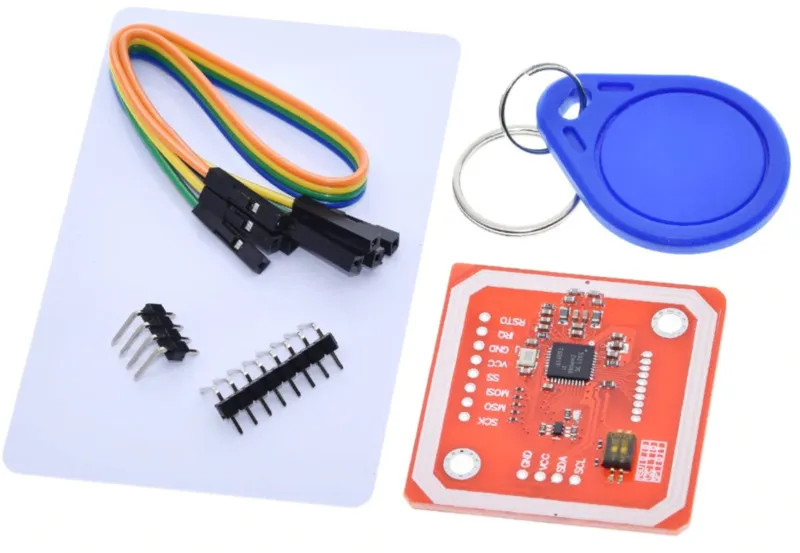
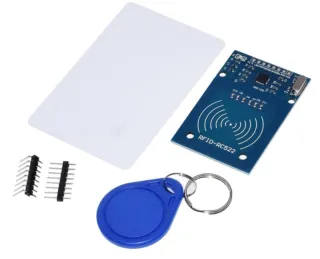
RFID/NFC-Modul für Mifare- und FeliCa-Tags mit mehreren Kommunikationsmodi.
SKU: OT2053-D82 Artikelnummer: NA144 EAN: 8499705714510 Lagerort: D08.02
Alternative
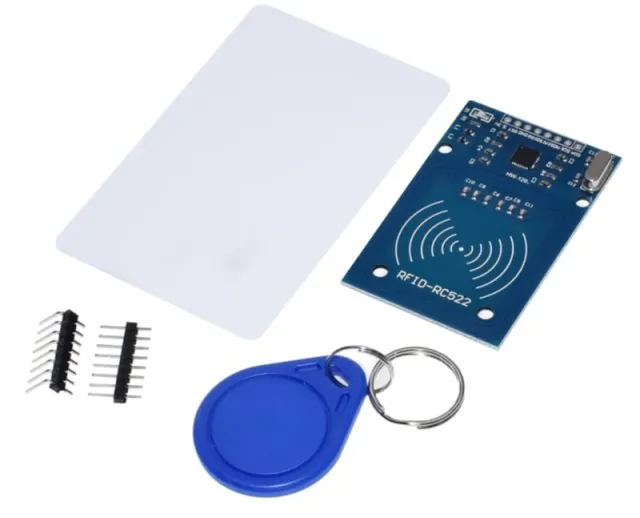
RFID-RC522 NFC Kit MFRC522 S50 Mifare inkl. RFID Fudan Card und Key Tag
€ 2,20
Diese Alternative ansehen
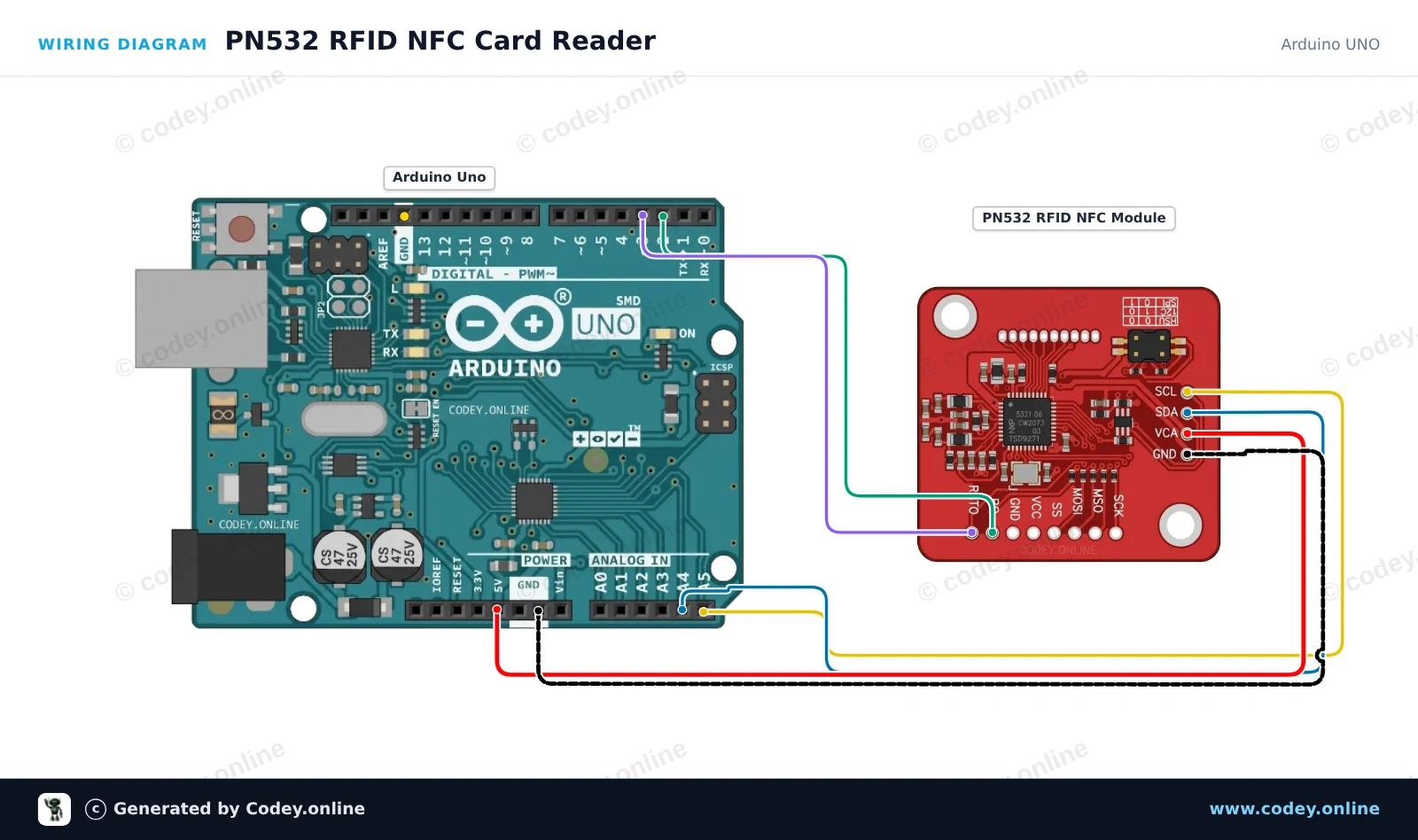
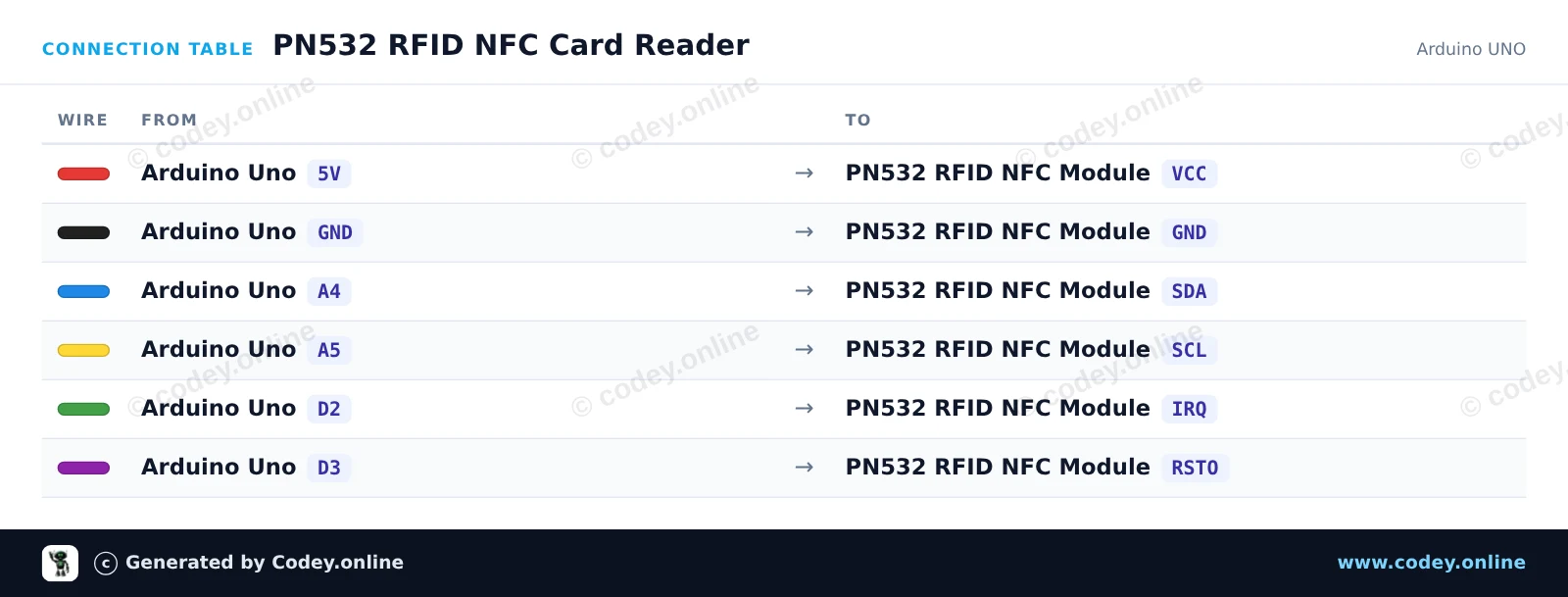
So schließt du den PN532 RFID NFC Kit mit S50 Karte und S50 Key Tag an einen Arduino UNO oder ESP32 an, mit einem Beispiel-Sketch, den du direkt hochladen kannst.
Dieses Beispiel liest RFID/NFC-Tags (z. B. Mifare-Karten) mit dem PN532-Modul über I2C aus. Stellen Sie sicher, dass die DIP-Schalter am PN532-Modul auf I2C-Modus eingestellt sind (meist CH1=ON, CH2=OFF). Halten Sie einen kompatiblen 13.56MHz NFC- oder RFID-Tag nahe an das Modul, um seine eindeutige UID im Serial Monitor auszugeben.
/*
* ==================================================================
* Generated by Codey.online — https://www.codey.online
* ==================================================================
* Project : PN532 RFID NFC Card Reader
* Board : Arduino UNO (arduino:avr:uno)
* Parts : PN532 RFID NFC Module
* Libraries : Adafruit PN532 1.3.4
*
* Codey Online is an AI-powered browser IDE for Arduino and ESP32.
* Describe your project and Codey writes the code, draws the wiring
* diagram and uploads it to your board, straight from the browser.
* This code is free to use, modify and share, without warranty.
* ==================================================================
*/
#include <Wire.h>
#include <Adafruit_PN532.h>
#define PN532_IRQ 2
#define PN532_RESET 3
Adafruit_PN532 nfc(PN532_IRQ, PN532_RESET);
void setup() {
Serial.begin(115200);
while (!Serial) delay(10);
Serial.println(F("Initializing PN532 NFC Module..."));
nfc.begin();
uint32_t versiondata = nfc.getFirmwareVersion();
if (!versiondata) {
Serial.println(F("PN532 board not found. Check wiring and I2C mode switch."));
while (1) delay(10);
}
Serial.print(F("Found PN532 chip! Firmware ver: "));
Serial.print((versiondata >> 24) & 0xFF, HEX);
Serial.print('.');
Serial.println((versiondata >> 16) & 0xFF, HEX);
nfc.SAMConfig();
Serial.println(F("Waiting for an ISO14443A card or tag..."));
}
void loop() {
uint8_t uid[7];
uint8_t uidLength = 0;
bool success = nfc.readPassiveTargetID(PN532_MIFARE_ISO14443A, uid, &uidLength, 500);
if (success) {
Serial.print(F("Found tag! UID: "));
for (uint8_t i = 0; i < uidLength; i++) {
if (uid[i] < 0x10) Serial.print('0');
Serial.print(uid[i], HEX);
if (i < uidLength - 1) Serial.print(':');
}
Serial.println();
delay(1000);
}
}
Benötigte Bibliotheken: Adafruit PN532 1.3.4
Wiring diagram and example code generated by Codey.online — https://www.codey.online
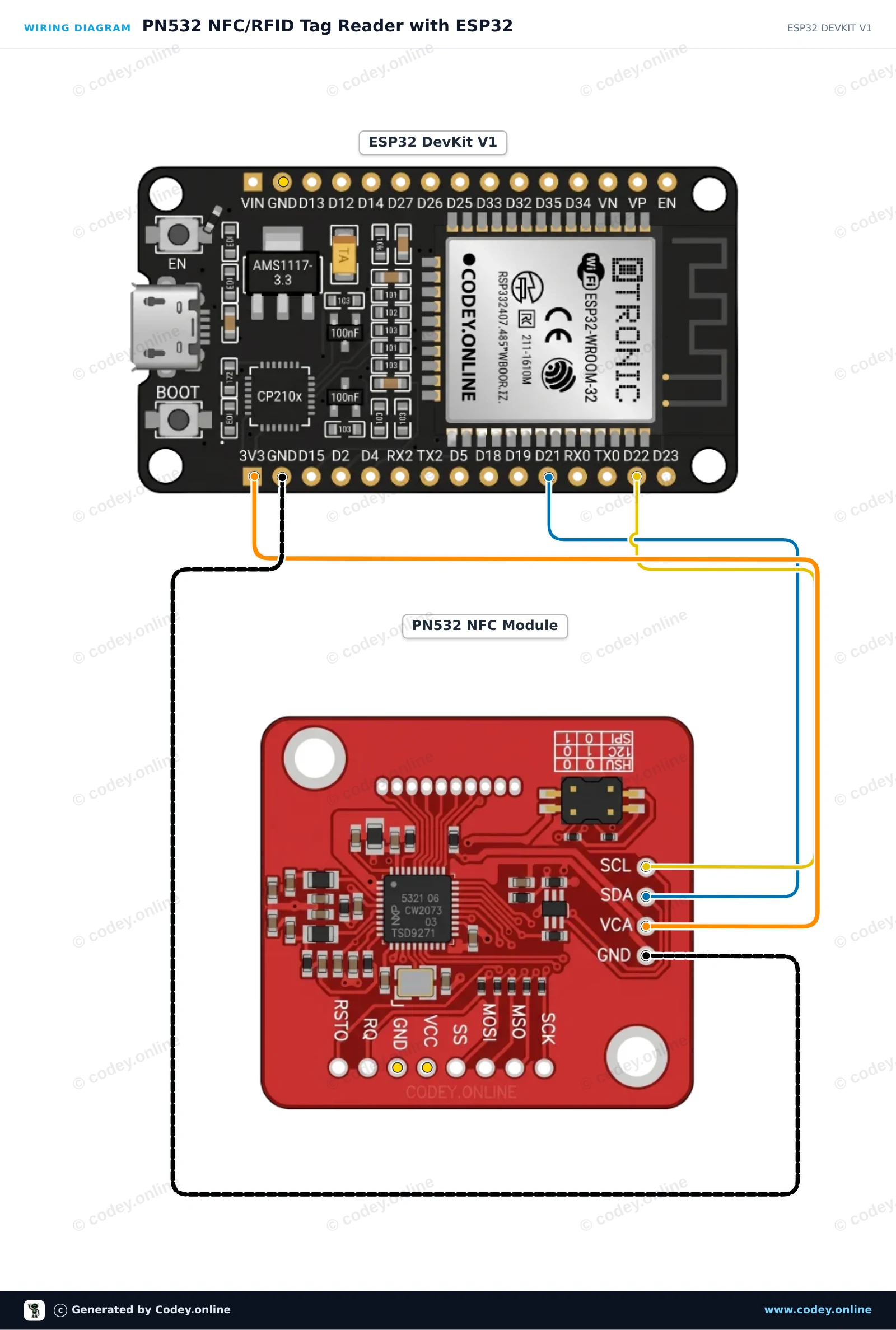
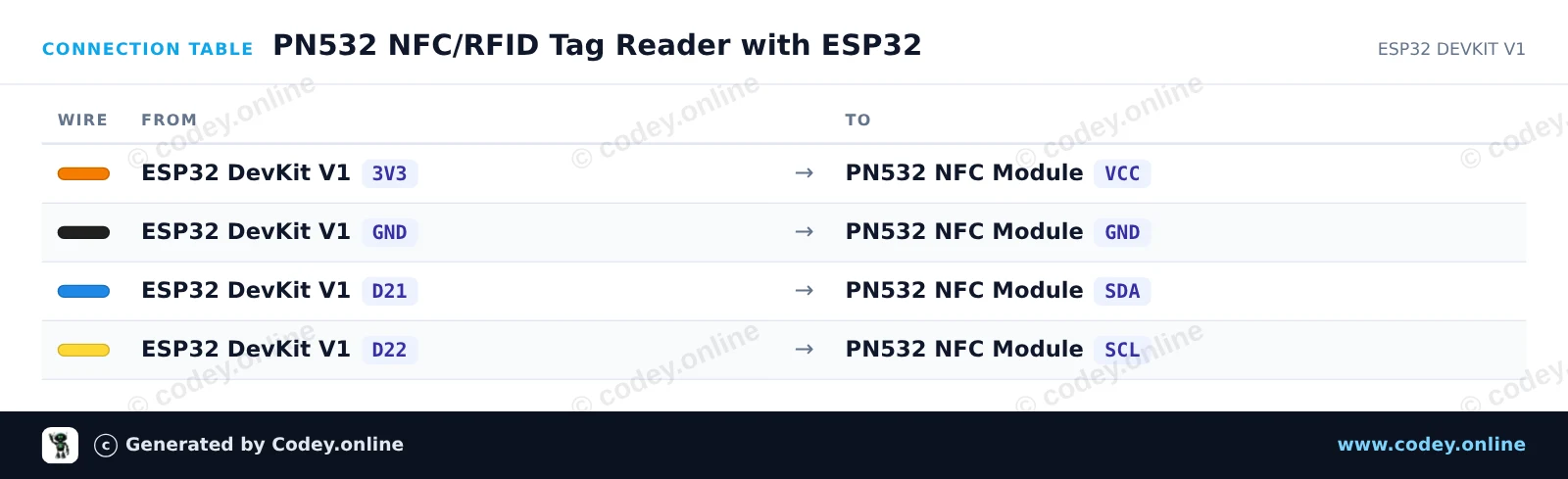
Diese Schaltung verbindet das PN532 NFC/RFID-Modul über I2C mit dem ESP32, um normale 13.56 MHz RFID-Tags oder NFC-Karten auszulesen. Stellen Sie sicher, dass die DIP-Schalter des Moduls auf I2C-Modus eingestellt sind (Channel 0=HIGH, Channel 1=LOW). Wenn eine Karte oder ein Schlüsselanhänger in die Nähe der Antenne gebracht wird, liest der ESP32 ihre eindeutige ID (UID) aus und gibt sie im Serial Monitor aus.
/*
* ==================================================================
* Generated by Codey.online — https://www.codey.online
* ==================================================================
* Project : PN532 NFC/RFID Tag Reader with ESP32
* Board : ESP32 DEVKIT V1 (esp32:esp32:esp32doit-devkit-v1)
* Parts : PN532 RFID NFC Module
* Libraries : Adafruit PN532 1.3.4
*
* Codey Online is an AI-powered browser IDE for Arduino and ESP32.
* Describe your project and Codey writes the code, draws the wiring
* diagram and uploads it to your board, straight from the browser.
* This code is free to use, modify and share, without warranty.
* ==================================================================
*/
#include <Wire.h>
#include <Adafruit_PN532.h>
// Use I2C interface without dedicated IRQ/Reset pins
#define PN532_IRQ (-1)
#define PN532_RESET (-1)
Adafruit_PN532 nfc(PN532_IRQ, PN532_RESET);
void setup() {
Serial.begin(115200);
while (!Serial) delay(10);
Serial.println("Initializing PN532 NFC Reader...");
nfc.begin();
uint32_t versiondata = nfc.getFirmwareVersion();
if (!versiondata) {
Serial.println("PN532 not found! Check DIP switches (I2C mode) and wiring.");
while (1) delay(100);
}
Serial.print("Found PN532 chip with firmware version: ");
Serial.print((versiondata >> 16) & 0xFF, DEC);
Serial.print('.');
Serial.println((versiondata >> 8) & 0xFF, DEC);
// Configure Secure Access Module (SAM)
nfc.SAMConfig();
Serial.println("Ready! Present an RFID card or NFC tag to the reader...");
}
void loop() {
uint8_t success;
uint8_t uid[] = { 0, 0, 0, 0, 0, 0, 0 };
uint8_t uidLength;
// Wait up to 500ms for an ISO14443A card
success = nfc.readPassiveTargetID(PN532_MIFARE_ISO14443A, uid, &uidLength, 500);
if (success) {
Serial.println("Card detected!");
Serial.print("UID Length: ");
Serial.print(uidLength, DEC);
Serial.println(" bytes");
Serial.print("UID: ");
nfc.PrintHex(uid, uidLength);
Serial.println();
delay(1000); // Debounce to avoid repeated rapid reads
}
}
Benötigte Bibliotheken: Adafruit PN532 1.3.4
Wiring diagram and example code generated by Codey.online — https://www.codey.online
Dieses PN532 RFID-Modul kann neben dem Senden und Empfangen von Mifare-Tags auch selbst Daten über NFC senden.
Das Modul kann über SPI, I2C oder UART angesteuert werden.
Spezifikationen:
Suchbegriffe: rfid, rfid kit, rfid-kit, rfid set, nfc set, nfc kit
Abmessungen
Länge: 4,3cm
Breite: 4cm
Höhe: 0,3cm
| Abmessungen | 4,3 x 4 x 0,3 cm |
|---|---|
| Schnittstelle | SPI, I2C oder UART |
| Geeignet für | 5V Systeme |
| Chip | NXP PN532 |
| Montagelöcher | 2 x 3 mm |
| Leseabstand | bis ~5-7cm |
Ich muss noch damit anfangen, aber es sieht wie erwartet aus
Nicht zufrieden? Du hast 30 Tage nach Erhalt Zeit, das Produkt zurückzusenden.
Alles zur Rücksendung
PN532 RFID NFC Kit mit S50 Karte und S50 Key Tag