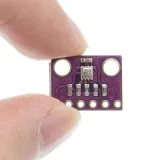
SKU: OT711-D64 Artikelnummer: NB078 EAN: 4184669585804

ACHTUNG 3.3V-Version. Geeignet für ESP8266, ESP32, Wemos D1 etc.
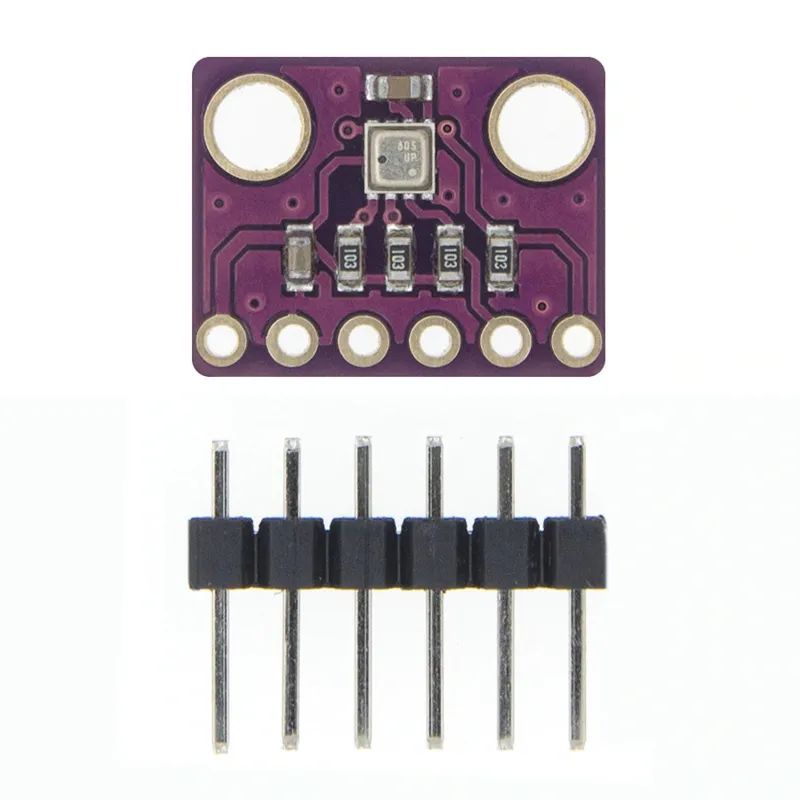
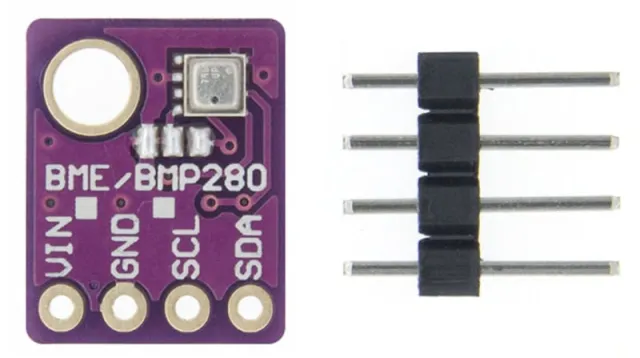
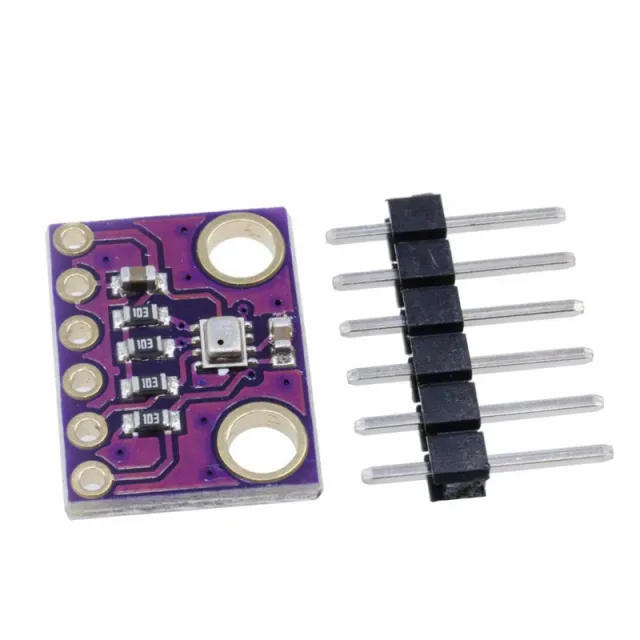
GY-BME280 ist ein Breakout-Board mit einem Bosch Sensortec ME280 Temperatur-, Luftfeuchtigkeits- und Luftdrucksensor.
Das Board hat eine wählbare I2C-Adresse (Lötbrücke GS2)
- I2C Pull-up-Widerstände
- Inklusive 7-Pin-Header 2.54mm
- zwei Montagebohrungen von 3.5mm.
BME280 Merkmale
- Sensor-Marke: Bosch
- Sensorgröße 2.5mm x 2.5mm x 0.93mm Metallgehäuse LGA
- Digitale Schnittstelle I2C (bis 3.4 MHz) und SPI (3- und 4-Draht, bis 10 MHz)
- Versorgungsspannung: 3V bis 3.6 V
- Stromverbrauch 1.8 uA @ 1Hz Feuchtigkeit und Temperatur, 2.8 uA @ 1Hz Druck und Temperatur. 3.6 uA @ 1Hz Feuchtigkeit, Druck und Temperatur und 0.1 uA im Schlafmodus
- Bereich Temperatursensor -40 / +85 C,
- Bereich Luftfeuchtigkeit; 0 - 100% rel. Luftfeuchtigkeit
- Bereich Luftdruck: 300- 1100 hPa
- Sowohl I2C als auch SPI
Abmessungen
Lengte: 1,47cm
Breedte: 1,14cm
Hoogte: 0,23cm
So schließt du den 3-in-1 Sensor Temperatur Luftfeuchtigkeit und Luftdruck | 3.3V | I2C und SPI | Bosch BME280 an einen Arduino UNO oder ESP32 an, mit einem Beispiel-Sketch, den du direkt hochladen kannst.
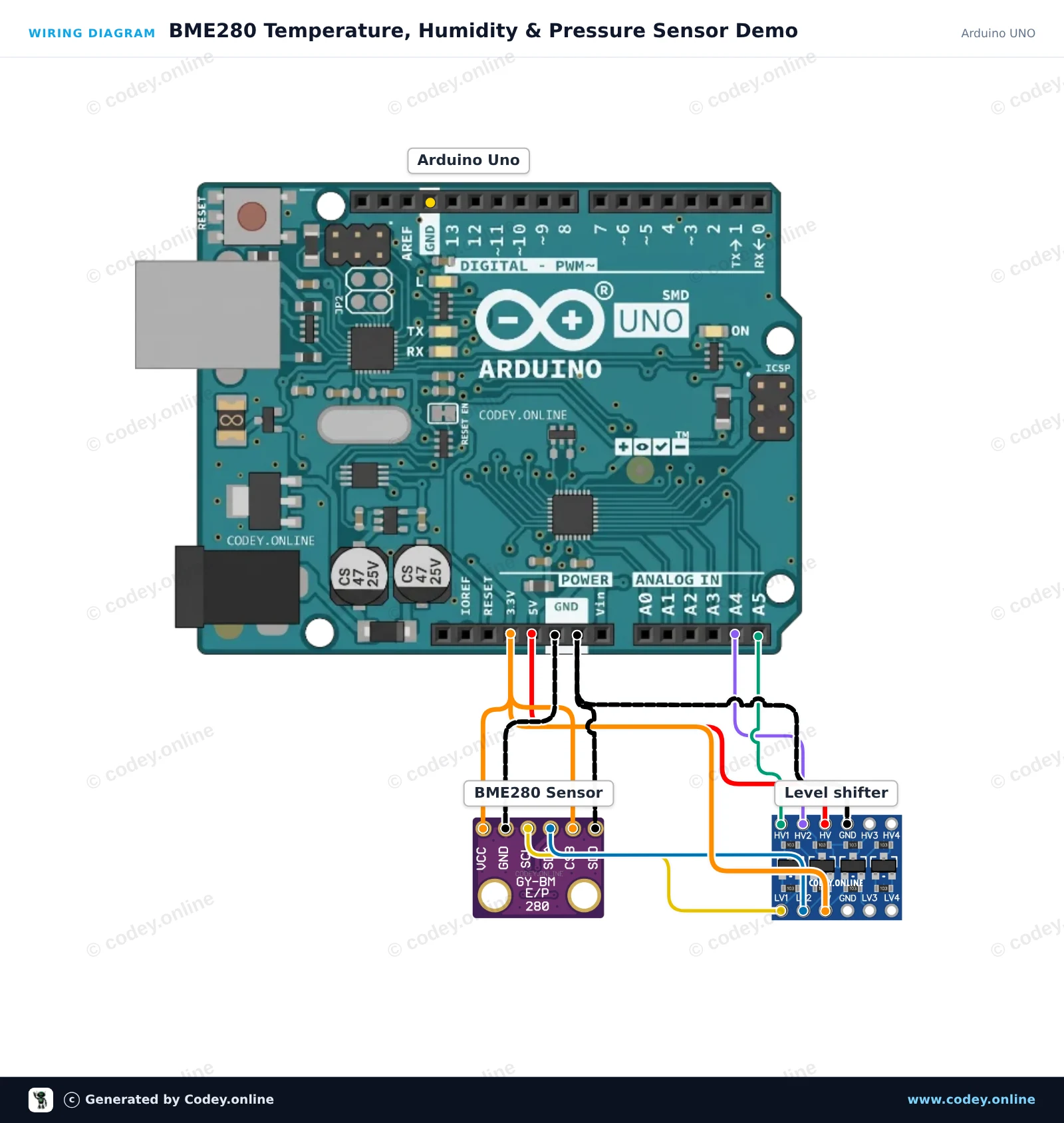
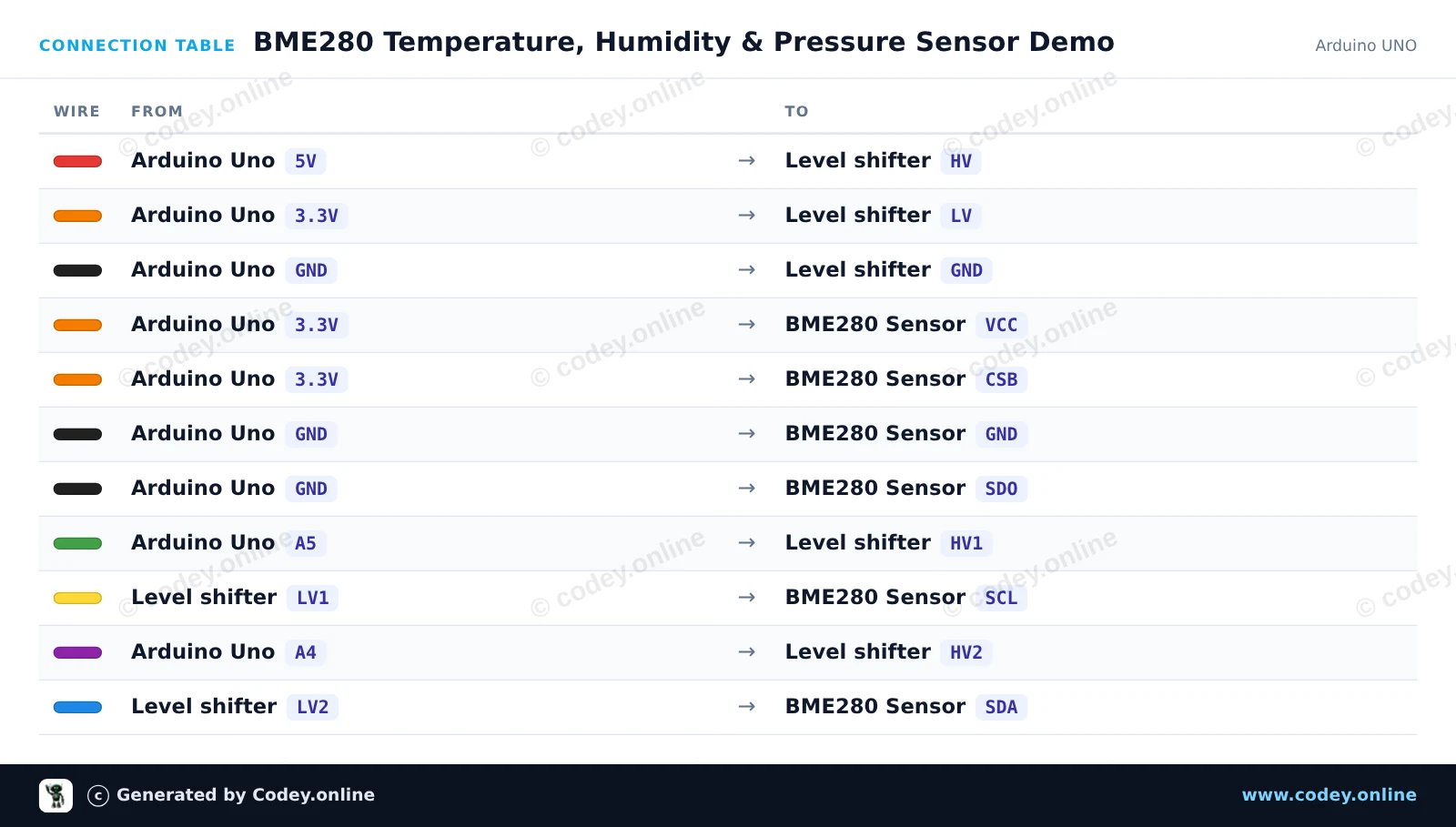
Dieses Projekt liest die Umgebungstemperatur, die relative Luftfeuchtigkeit und den Luftdruck mit einem 3.3V BME280-Sensor aus, der an einen Arduino Uno angeschlossen ist. Ein bidirektionaler 4-Kanal-Logic-Level-Shifter wandelt die 5V I2C-Signale sicher auf 3.3V herunter. Die Sensordaten werden alle zwei Sekunden im Serial Monitor ausgegeben.
/*
 * ==================================================================
 *  Generated by Codey.online  —  https://www.codey.online
 * ==================================================================
 *  Project   : BME280 Temperature, Humidity & Pressure Sensor Demo
 *  Board     : Arduino UNO (arduino:avr:uno)
 *  Parts     : Bosch BME280 3.3v 3-in-1 sensor Temperature Humidity and Air Pressure
 *  Libraries : Adafruit BME280 Library 2.3.0, Adafruit Unified Sensor 1.1.15
 *
 *  Codey Online is an AI-powered browser IDE for Arduino and ESP32.
 *  Describe your project and Codey writes the code, draws the wiring
 *  diagram and uploads it to your board, straight from the browser.
 *  This code is free to use, modify and share, without warranty.
 * ==================================================================
 */

#include <Wire.h>
#include <Adafruit_Sensor.h>
#include <Adafruit_BME280.h>

Adafruit_BME280 bme;

void setup() {
  Serial.begin(115200);
  while (!Serial) delay(10);

  Serial.println(F("Initializing BME280 sensor..."));

  // SDO tied to GND sets address to 0x76
  if (!bme.begin(0x76, &Wire)) {
    Serial.println(F("Could not find BME280 sensor. Check wiring!"));
    while (1) delay(100);
  }

  Serial.println(F("BME280 sensor ready!"));
}

void loop() {
  float temperature = bme.readTemperature();
  float humidity = bme.readHumidity();
  float pressure = bme.readPressure() / 100.0F; // Convert Pa to hPa

  Serial.print(F("Temperature: "));
  Serial.print(temperature, 1);
  Serial.print(F(" °C | Humidity: "));
  Serial.print(humidity, 1);
  Serial.print(F(" % | Pressure: "));
  Serial.print(pressure, 1);
  Serial.println(F(" hPa"));

  delay(2000);
}Benötigte Bibliotheken: Adafruit BME280 Library 2.3.0, Adafruit Unified Sensor 1.1.15
Wiring diagram and example code generated by Codey.online — https://www.codey.online
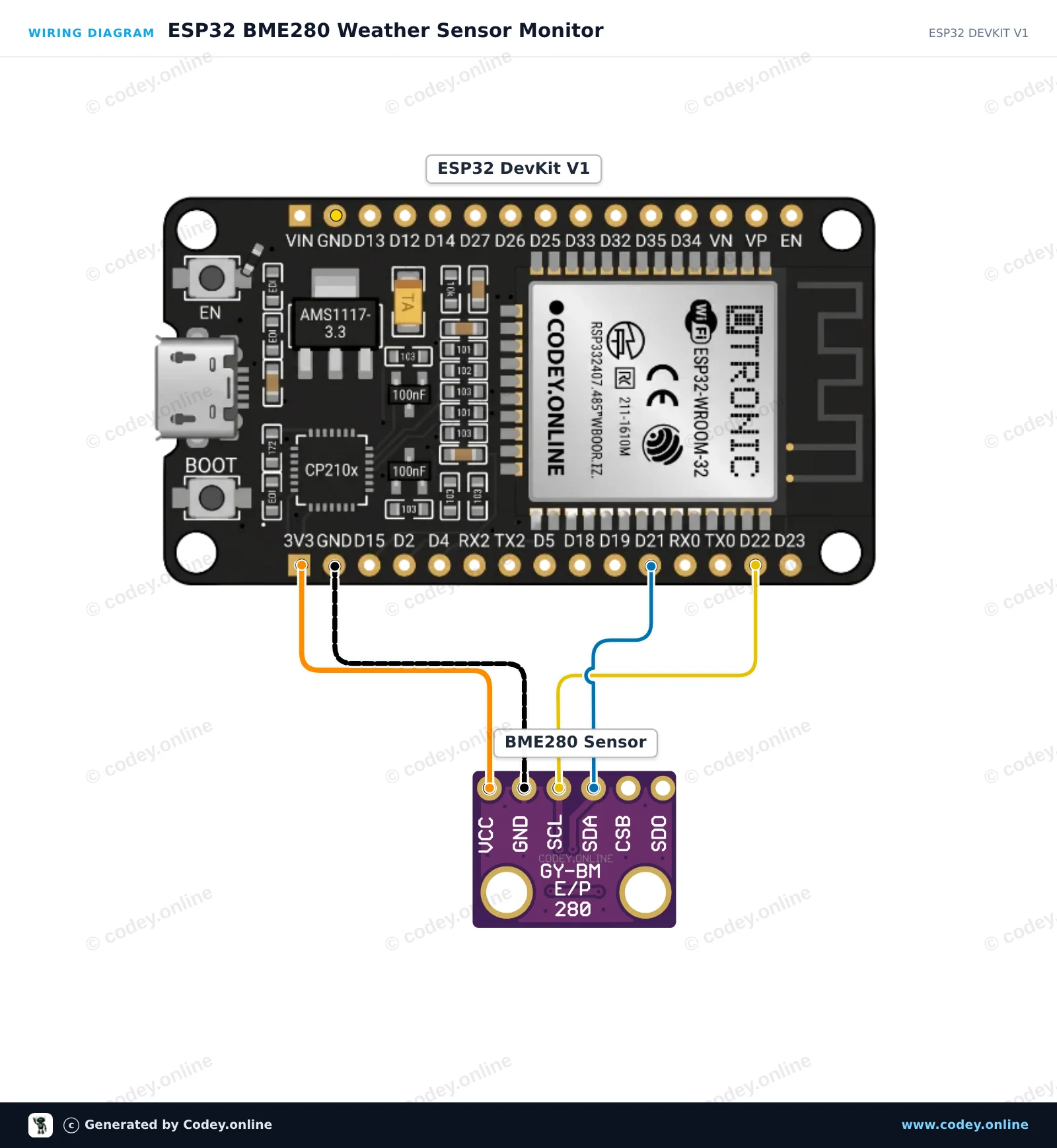
Dieses Projekt liest die Umgebungstemperatur, die relative Luftfeuchtigkeit und den Luftdruck vom Bosch BME280-Sensor über die I2C-Schnittstelle aus. Verbinde den 3.3V-Sensor direkt mit der ESP32-Versorgung und den standardmäßigen I2C-Pins (GPIO 21 und 22). Öffne den Seriellen Monitor mit 115200 baud, um die Echtzeit-Umweltmesswerte anzuzeigen, die alle zwei Sekunden aktualisiert werden.
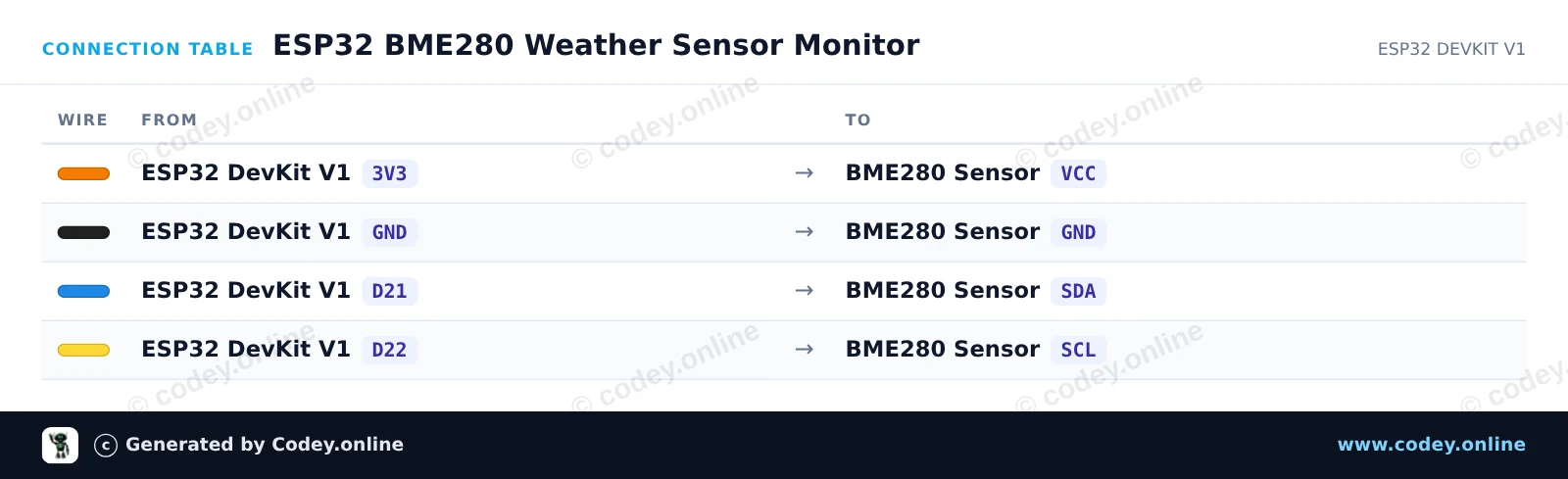
/*
 * ==================================================================
 *  Generated by Codey.online  —  https://www.codey.online
 * ==================================================================
 *  Project   : ESP32 BME280 Weather Sensor Monitor
 *  Board     : ESP32 DEVKIT V1 (esp32:esp32:esp32doit-devkit-v1)
 *  Parts     : Bosch BME280 3.3v 3-in-1 sensor Temperature Humidity and Air Pressure
 *  Libraries : Adafruit BME280 Library 2.3.0, Adafruit Unified Sensor 1.1.15
 *
 *  Codey Online is an AI-powered browser IDE for Arduino and ESP32.
 *  Describe your project and Codey writes the code, draws the wiring
 *  diagram and uploads it to your board, straight from the browser.
 *  This code is free to use, modify and share, without warranty.
 * ==================================================================
 */

#include <Wire.h>
#include <Adafruit_Sensor.h>
#include <Adafruit_BME280.h>

Adafruit_BME280 bme;

void setup() {
  Serial.begin(115200);
  while (!Serial) delay(10);

  Serial.println("Initializing BME280 sensor...");

  // Default I2C address is usually 0x76 or 0x77
  if (!bme.begin(0x76) && !bme.begin(0x77)) {
    Serial.println("Could not find a valid BME280 sensor! Check wiring.");
    while (1) delay(100);
  }

  Serial.println("BME280 initialized successfully.");
}

void loop() {
  float temperature = bme.readTemperature();
  float humidity = bme.readHumidity();
  float pressure = bme.readPressure() / 100.0F; // Convert Pa to hPa

  Serial.print("Temperature: ");
  Serial.print(temperature);
  Serial.println(" °C");

  Serial.print("Humidity:    ");
  Serial.print(humidity);
  Serial.println(" %");

  Serial.print("Pressure:    ");
  Serial.print(pressure);
  Serial.println(" hPa");

  Serial.println("------------------------");
  delay(2000);
}Benötigte Bibliotheken: Adafruit BME280 Library 2.3.0, Adafruit Unified Sensor 1.1.15
Wiring diagram and example code generated by Codey.online — https://www.codey.online





 English
  Nederlands
  Frans
Frans  Italiano
  Español
  Suomi
Suomi  Polski
  Dansk
Dansk  Ελληνικά
  Български
  Čeština
  Hrvatski
  Aileen